Skip to content
Engineering Calculation Software

Engineering calculations that document themselves.

The calc package you stitch together from a patchwork of disconnected tools — in one document. Unit-aware math, code-referenced templates, interactive charts, and a vector-PDF binder, all live-linked.

Card required · cancel anytime before the trial ends · founder rate locked through 2027.

app.engcanvas.com
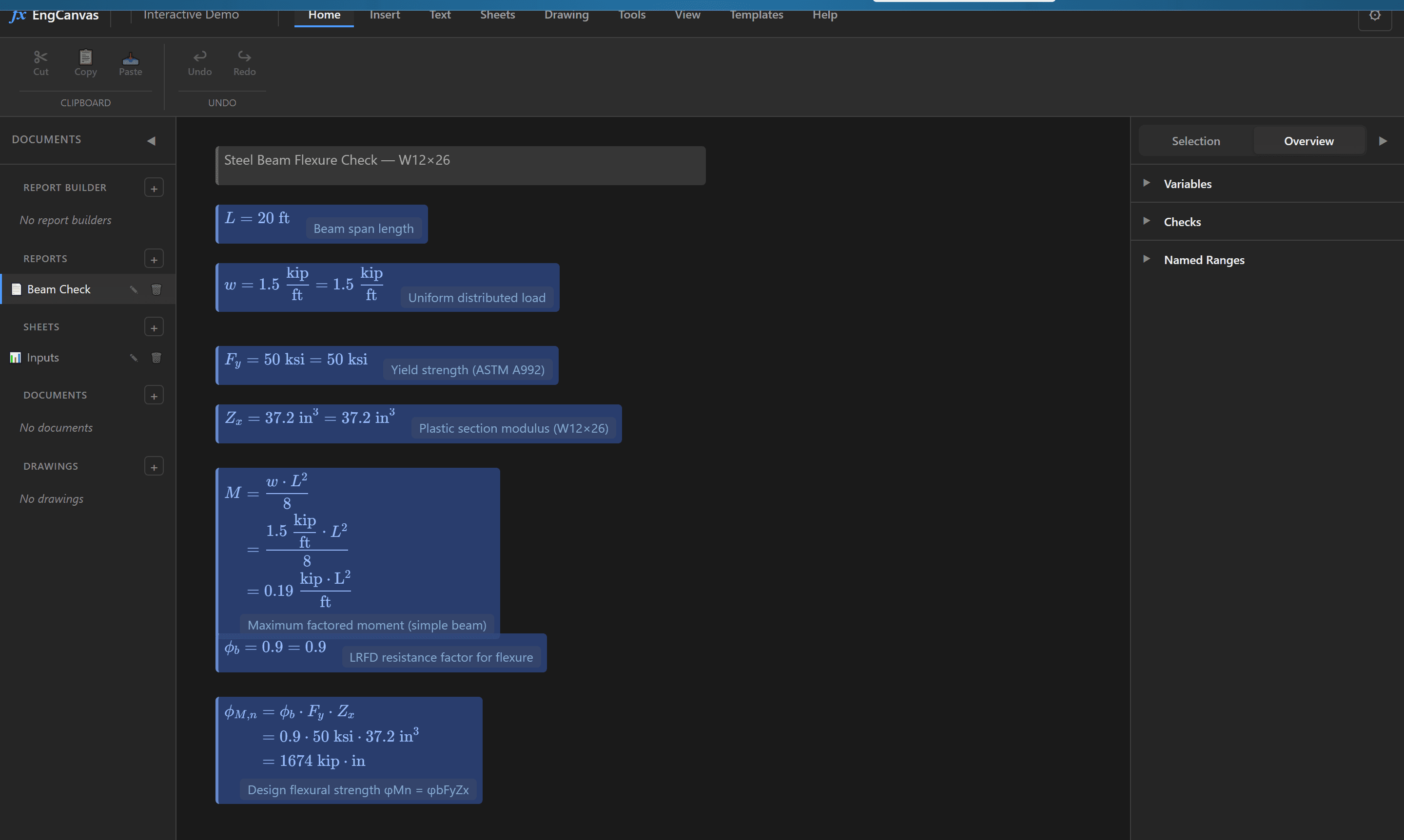
EngCanvas showing a steel beam flexure check (W12×26): unit-aware formulas with LaTeX-rendered results — maximum moment Mu = wL²/8 and design strength φMn = φb·Fy·Zx — laid out on the report canvas.
Unit-aware math engine60+ engineering units160+ spreadsheet functions22 chart familiesASCE 7 · ACI 318 · TMS 402 templatesVector PDF exportReport binder

Sound familiar?

Every engineer has wasted hours stitching these tools together — and re-stitching them after every revision. EngCanvas folds the whole packet into one document.

One packet, five tools

A finished calc package gets stitched together from a half-dozen apps — Excel for the math, code-clause lookups, a CAD detail, Bluebeam to bind it. Every handoff is a chance for a number to drift out of sync.

Excel → CAD → Bluebeam
One document → PDF binder

Manual unit tracking

You convert kip to lb, ft to in, and psi to ksi by hand — hoping you didn't drop a factor of 1000. Unit errors have caused real structural failures. Your calculator doesn't catch them.

1000 * 12 / 144 = ???
1000 psi × 144 in² = 144 kip ✓

Drawings and docs go stale

You revise one input, but the Word write-up, the CAD detail, and the Bluebeam markup still show the old numbers. Re-syncing by hand is slow — and skipping it is how wrong dimensions ship.

Change input → redraw → re-bind by hand
Change input → everything updates live

Three steps. Zero reformatting.

From formula to stamped PDF without switching tools.

01

Write

Type formulas with real units

Write engineering expressions the way you think. Assign variables, reference cells, and use 160+ built-in functions. Units are first-class — type '25 ft' and the system tracks dimensions automatically.

Define spanL = 25 ft
Factored loadwu = 1.2 × DL + 1.6 × LL = 2.4 kip/ft
Max momentMu = wu × L² / 8 = 187.5 ft·kip
02

Calculate

Instant results with unit validation

Every formula evaluates in real-time with full dimensional analysis. The engine catches unit mismatches before they become design errors. Cross-reference between sheets, use VLOOKUP on steel tables, and goal-seek to target values.

Steel lookupVLOOKUP("W12×26", SteelTable, 3) = 204 in⁴
Unit conversionMu = 187.5 ft·kip = 2250 in·kip ✓
Stress checkfb = Mu / Sx = 22.1 ksi < 24 ksi ✓
03

Document

Export PE-ready PDF reports

Your calculations are already documented. Arrange them visually on the report canvas, add headings and notes, then export a professional PDF with your company header, PE stamp, and page numbers. One click.

Report titleBeam Design — Level 3 Framing
Auto-formattedMu = wu × L² / 8 = 187.5 ft·kip
Export→ PDF with cover page & TOC
Bring your own spreadsheet

Already built it in Excel? Import it — then add units.

Drop in your existing .xlsx calculator. EngCanvas keeps your formulas and cell references intact, then lets you tag cells with real units. From that moment every downstream formula is unit-aware — and dimensional mistakes get caught instead of shipped.

  • Formulas and cross-sheet references preserved on import
  • Tag a cell once — units flow through every formula that uses it
  • No rewrite, no macros: your sheet, with a unit engine behind it
Import your spreadsheet
Before — plain Excel
B2 = 20    C2 = 1.5
D2 = B2^2*C2/8 → 75
75 of what? kip·ft? lb·in?
import + tag units ↓
After — in EngCanvas
L = 20 ft    w = 1.5 kip/ft
Mu = w·L²/8 = 75 kip·ft
units carried + checked ✓

See it in action

Type formulas with real units, watch results update live with every step shown, and export a PE-ready PDF — all in one document.

EngCanvas logoapp.engcanvas.com
Transparent · step-by-step
EngCanvas showing a steel beam flexure check with unit-aware, LaTeX-rendered formulas and every calculation step laid out on the report canvas.

Card required · cancel anytime before the trial ends.

Built for how engineers actually work

Not another generic spreadsheet. Every feature was designed for engineering calculation workflows.

Core Engine

Unit-Aware Math Engine

60+ engineering units with automatic dimensional analysis. Multiply force by distance and get moment. Divide load by area and get stress. The engine tracks Length, Mass, Time, and Force dimensions through every operation — and catches mismatches before they become design errors.

Supports compound units: kip/ft, lb/in², ft·kip, pcf, and more

Unit-Aware Math Engine
P = 50 kip50 kip
A = 12 in × 18 in216 in²
σ = P / A0.231 ksi
M = P × 10 ft500 ft·kip
Spreadsheet

Spreadsheet Grid

A full spreadsheet with 160+ functions — SUM, VLOOKUP, IF, LINTERP, and engineering-specific functions like REBAR and CONC_FC. Cross-sheet references, named ranges, freeze panes, and formula highlighting. Everything you need from Excel, with units built in.

Cross-sheet references, named ranges, and Excel .xlsx import/export

Spreadsheet Grid
SUM($A$1:$A$10)Σ = 450 kip
VLOOKUP("W12×26", Steel, 4)Ix = 204 in⁴
LINTERP(x_data, y_data, 3.5)= 12.7 ksi
$Loads!B10 + $Wind!C5= 85.2 kip
Report Canvas

Visual Report Canvas

Drag calculation boxes, tables, charts, and notes onto an infinite canvas. Arrange your work spatially — group related calculations, add headings, embed live charts. Every box evaluates live and renders beautiful LaTeX notation. It's a digital engineering notepad.

22 interactive chart families via ECharts — P-M interaction, V/M shear-moment, pressure diagrams

Visual Report Canvas
Variable boxfc' = 4000 psi
Equation boxϕMn = 0.9 × As × fy × (d − a/2)
Chart boxP-M interaction diagram (ECharts)
Table boxLoad combinations table
PDF & Binder

Vector PDF & Report Binder

One-click export to true vector PDFs — selectable text, crisp KaTeX math, and small files (no rasterized screenshots). The Report Binder assembles a cover, table of contents, index, reports, sheets, and drawings — in any order — into a single PDF with continuous page numbering. Your calculations go straight from screen to the reviewer's desk.

Single vector-PDF binder — cover, TOC, index, and continuous page numbers across every section

Vector PDF & Report Binder
Vector outputSelectable text + crisp KaTeX
Report BinderCover · TOC · index · reports
Any orderReports, sheets, drawings → one PDF
Page numbersContinuous across sections
Why I built this
I'm an EIT structural designer, and I kept rebuilding the same calculation packages in Excel and Word — hidden formulas, units tracked by hand, and hours lost reformatting before anything could be reviewed. I wanted to write calcs the way I actually think, with real units, and get a clean report in one step. So I built EngCanvas.

It's brand new — you'd be one of the first to use it. Try it, and tell me what's missing.
Alec
EIT · Structural Designer · Founder, EngCanvas

EngCanvas vs. the old way

What one calc packet takes — in EngCanvas vs. the usual stack of tools.

Write a formula
EngCanvas:Type with named variables and units
Usual stack:Click cells, hope labels are nearby
Track units
EngCanvas:Automatic dimensional analysis (ft × kip = ft·kip)
Usual stack:Manual — add comments or cell labels
Verify units match
EngCanvas:Engine prevents unit mismatches
Usual stack:You check by hand (or don't)
Look up a steel shape
EngCanvas:VLOOKUP("W12×26", SteelTable, 3) — with units
Usual stack:Paste an AISC table by hand
Reference another sheet
EngCanvas:$Loads!B10 — units carry across
Usual stack:Loads!B10 — units? What units?
Show your work to a reviewer
EngCanvas:Formulas are readable: Mu = wu × L² / 8
Usual stack:Reviewer clicks each cell individually
Cite the code clause
EngCanvas:Switch editions from a dropdown — refs update
Usual stack:Re-type clauses by hand each edition
Produce a construction detail
EngCanvas:Parametric detail bound to the calc
Usual stack:Redraw in Revit/CAD every revision
Create a calculation report
EngCanvas:Already done — export to PDF
Usual stack:Copy to Word, reformat the equations
Change a design parameter
EngCanvas:Change one value — calc, report & drawings update
Usual stack:Redo the math, the doc, and the detail
Assemble the final packet
EngCanvas:Cover, TOC & page numbers in one PDF binder
Usual stack:Merge & renumber pages in Bluebeam
Add the PE stamp and cover page
EngCanvas:Built-in: header, footer, stamp area, TOC
Usual stack:Word template + Bluebeam stamp
Time to complete the packet
EngCanvas:~30 minutes, one tool
Usual stack:~half a day across four or five tools

Frequently asked questions

Everything you need to know about EngCanvas.

EngCanvas is a paid product, but you start with a 7-day free trial. A card is required to begin, you won't be charged during the trial, and you can cancel anytime before it ends. After the trial it's $49/mo for a single user — a founder rate locked through the end of 2027 if you start now.

Yes. EngCanvas can import .xlsx files with automatic formula conversion. Your cell references, named ranges, and common functions (SUM, VLOOKUP, IF, etc.) are preserved. Units aren't part of standard Excel, so you'll add those as you work — but the import gives you a head start.

EngCanvas is built for any discipline that uses unit-aware calculations. It's especially well-suited for structural engineers (beam design, concrete, steel connections), civil engineers (hydraulics, grading), and mechanical engineers (machine design, thermal analysis). The 60+ built-in unit types cover force, stress, length, area, volume, moment, pressure, and more.

Calculations run client-side in your browser, and your projects sync to the cloud so they're backed up and available across devices. Cloud data is encrypted at rest (AES-256) and in transit (TLS 1.3). We never access, sell, or share your engineering data.

Yes. The PDF export includes customizable company headers and footers, a professional cover page with project details, automatic table of contents, page numbering, and a designated PE stamp/seal area — so you can produce calculation packages formatted for plan review. You apply your own seal: EngCanvas formats the deliverable, it doesn't provide certification.

Every value carries dimensional metadata tracking Length, Mass, Time, and Force. When you write '50 kip / (12 in × 18 in)', the engine automatically computes the result in ksi (kip/in²). If you accidentally try to add force to length (e.g., '5 kip + 10 ft'), the engine will flag the dimensional mismatch immediately — before it becomes a design error.

All calculations are performed client-side in your browser using our JavaScript math engine — results update instantly with no server round-trips. You'll sign in to access the app and to sync your projects to the cloud.